
Verify legal permission for stablecoin wages
Before initiating any USDC payroll transactions, confirm that local labor laws explicitly permit stablecoin compensation. Paying full-time employees in USDC is illegal in many jurisdictions unless local regulations allow it and all mandatory benefits, tax withholding, and reporting obligations are met. Treat compliance as a prerequisite, not an afterthought.
Consult official government labor departments and tax authorities in the employee’s jurisdiction. Do not rely on general crypto guides or platform disclaimers to determine legality. You must confirm whether stablecoins are recognized as legal tender or valid payment methods for wages in that specific region.
Document your compliance process. Keep records of all legal consultations, policy updates, and employee consent forms. This documentation serves as your primary defense in the event of an audit or legal challenge. Compliance is an ongoing obligation, not a one-time setup step.
Select a compliant payroll platform
Selecting a payroll provider for USDC requires distinguishing between general crypto payment gateways and platforms built for employment compliance. Not all providers support stablecoins, and fewer still handle the complex tax reporting requirements for digital asset compensation. A compliant platform must support USDC specifically, as it holds 63% of the global stablecoin payroll market share according to Pantera Capital.
Focus on three core capabilities: USDC settlement, automated tax documentation, and geographic coverage. Avoid platforms that treat crypto payroll as a secondary feature or lack clear guidance on Form 1099-NEC reporting for digital assets. The following comparison outlines the primary options available for 2026.
| Provider | USDC Support | Tax Automation | Countries |
|---|---|---|---|
| Rise | Native | Yes | Global |
| Bitwage | Yes | Partial | US, EU |
| Eco | Yes | Yes | Global |
| Deel | Limited | Yes | 150+ |
Rise and Eco offer the most comprehensive native support for USDC, with Rise accounting for 80% of crypto payroll volume on its platform. Bitwage provides stablecoin options but limits tax automation features in certain jurisdictions. Deel supports USDC in limited capacities, primarily for contractor payments in specific regions.
Verify that your chosen platform generates IRS-compliant reports for both employer and employee. This includes tracking the fair market value of USDC at the time of payment and providing clear records for annual tax filing. Failure to maintain accurate records can result in significant penalties for both parties.
Configure tax withholding and reporting
Mapping stablecoin payouts to fiat tax obligations is the most critical compliance step in USDC payroll. Because USDC is a digital asset, the transaction itself does not automatically trigger tax reporting. You must configure your payroll platform to calculate, withhold, and report taxes as if the payment were fiat currency.
Failure to map these obligations correctly can result in severe penalties for both the employer and the employee. The following steps outline how to align your USDC disbursement workflow with standard tax compliance requirements.

Determine whether each recipient is a W-2 employee or a 1099 independent contractor. This classification dictates the withholding rules. For employees, you must withhold federal income tax, Social Security, and Medicare taxes. For contractors, no withholding is typically required, but you must track the gross payment for year-end reporting.
Configure your payroll system to calculate tax liabilities based on the fiat value of the USDC at the time of payout. Even though the employee receives stablecoin, the tax authority views the transaction as a fiat-equivalent payment. Ensure your platform uses a reliable oracle or exchange rate to lock in the USD value for tax calculations before the transfer is executed.
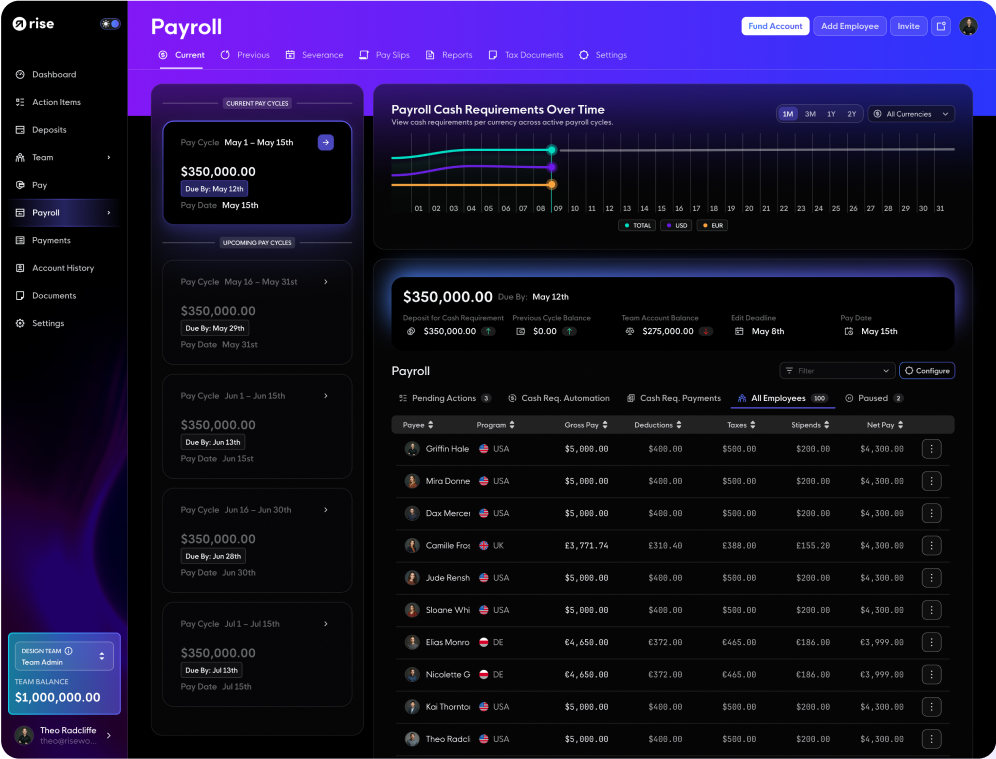
Enable automated form generation within your payroll provider. The system must produce accurate 1099-NEC forms for contractors and W-2 forms for employees, reflecting the total USDC paid out. Verify that the platform can submit these forms directly to the IRS and provide digital copies to your workers, ensuring they have the documentation needed for their own tax filings.
Full-time employees can be paid in USDC only when local employment laws allow and all mandatory benefits, tax withholding, and reporting obligations are met [Toku]. This means your configuration must be robust enough to handle these legal requirements automatically. Do not rely on manual spreadsheets to track stablecoin tax liabilities, as errors in conversion rates or withholding percentages can lead to significant compliance failures.
If your payroll provider does not natively support stablecoin tax reporting, you may need to integrate a third-party compliance tool. Always verify that the tool you choose is audited and compliant with current IRS guidance on digital asset transactions. The goal is to make the stablecoin payment indistinguishable from a fiat payment in the eyes of tax authorities.
Onboard contractors and employees
Onboarding USDC payroll recipients requires strict identity verification before any funds move. Unlike traditional banking, blockchain transactions are irreversible. A single error in a wallet address or a missed KYC step can result in permanent loss of funds or regulatory penalties.
Follow this sequence to ensure every team member is verified and ready for payment.
Require government-issued ID, proof of address, and tax forms (W-9 or W-8BEN) from all contractors and employees. Use a compliant KYC provider to validate these documents against official databases. Do not proceed to wallet setup until identity is confirmed.
Ask recipients to provide their USDC wallet address on the specific network your payroll system uses (e.g., Ethereum, Solana, or Polygon). Instruct them to send a small test transaction first to confirm the address is active and correct. Verify the network matches your payout channel to prevent loss.

Configure each recipient’s profile in your payroll software. Specify the payout frequency, amount, and preferred wallet. Ensure tax withholding rules are applied correctly before the first cycle begins. Maintain a record of these preferences for audit purposes.

Send a minimal test amount (e.g., $1 USDC) to each new recipient. Confirm they receive it and can access the funds. This step validates the entire chain: identity, address, network, and software configuration. Only after successful test payments should you enable full payroll cycles.
Run a test payroll batch
Before processing a full company payroll in USDC, execute a small-scale test run. This step verifies transaction speeds, fee structures, and receipt confirmation without risking employee compensation or compliance violations. Treat this test as a dry run for your entire operational workflow.
Select two or three test recipients, including at least one employee and one contractor. Process payments using the exact amounts, gas fees, and network settings you intend for the live cycle. This confirms that your payroll software correctly calculates net pay after on-chain fees and that recipients can successfully receive and view the funds.
Monitor the settlement time on the chosen blockchain network. USDC transactions typically settle in seconds to minutes, but network congestion can cause delays. Verify that your accounting system records the transaction hash and timestamp accurately for audit trails. If any step fails—whether it is a failed transfer, incorrect fee deduction, or missing receipt—adjust your configuration before the next payroll date.
Address common payroll concerns
Addressing specific concerns about stability and legal compliance is necessary before adopting stablecoin payments. The following FAQ clarifies the definition, safety mechanisms, and regulatory boundaries of USDC payroll.
No comments yet. Be the first to share your thoughts!